The short answer
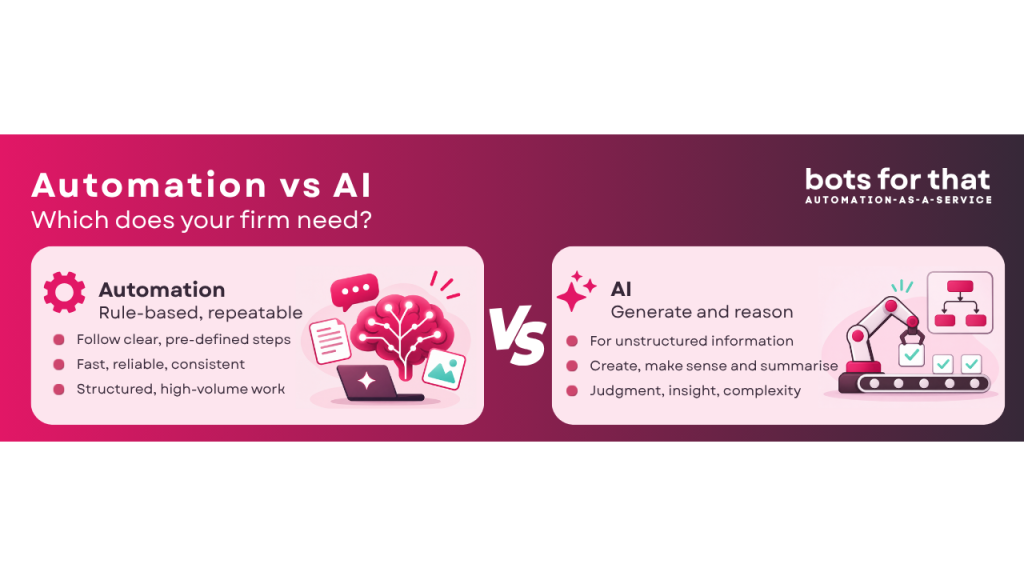
Traditional automation and AI are two different tools for two different jobs, and most accounting work needs the first one, but not always the second.
Traditional automation (you may hear it called RPA, workflow automation or rules-based automation) follows instructions exactly, every time. AI, meaning the generative AI models behind tools like ChatGPT and Claude, makes sensible judgement calls from messy information. Each is brilliant at its own job but not at the other’s.
In our experience, as much as 80% of the work inside a typical accounting firm can be handled without AI at all. That is our own estimate from working with firms, not a measured statistic. The point is simple though: before you ask “where can we use AI?”, ask “what kind of work is this?”
Two kinds of smart
Think of traditional automation as a very reliable recipe follower. You write down every step once: when an invoice arrives, read these fields, check them against this list, post it here, flag it if the total is over this amount. From then on it does exactly that, the same way, every single time. It never gets creative, and it never gets tired or distracted.
Think of generative AI as a quick-thinking assistant who has read a huge amount and can work things out. Give it a pile of messy information and it can summarise it, spot what matters, draft a reply or suggest an idea. But like any assistant working from judgement rather than a rulebook, it can give a slightly different answer each time, and occasionally it is confidently wrong.
| Traditional automation (RPA, workflows) | Generative AI | |
| How it works | Follows rules you define in advance | Predicts a sensible answer from patterns it has learned |
| Same input, same output? | Yes, every time | Not guaranteed |
| Best at | Repeatable, rule-based tasks | Messy, varied or open-ended tasks |
| Struggles with | Anything it has no rule for | Output consistency, non-cloud systems |
| Can you explain why it did that? | Yes, you can log and trace every step | Often not, in any detail |
| If it gets something wrong | You fix the rule and it stays fixed | It may repeat or vary the mistake |
Why most accounting work doesn’t need AI
Most accounting work is deterministic. That is a fancy word for a simple idea: given the same inputs, there is one correct answer, and you want to get it every time.
VAT is calculated by a rule. A bank reconciliation either matches or it does not. A payroll run follows the same steps each month. A client onboarding checklist has the same items for every new client. A tax computation, a Companies House filing deadline, an invoice approval above a set value: all rules, all repeatable.
For work like this, predictability is the whole point. Partners, clients, auditors and HMRC all expect a number that can be traced back and explained. “The model thought this looked about right” is not an answer you can put in front of any of them.
You could point a generative AI model at much of this work, and it might even get it right most of the time. But “most of the time” is the wrong standard for work that has a right answer. It is a bit like hiring a gifted improviser to run your payroll: impressive, but not what you need.
Rules-based automation is the better fit. It is faster to set up for this kind of work, cheaper to run, easy to audit and, once it works, it keeps working.
Where AI genuinely earns its place
AI shines best where the rulebook is less fixed and defined, but where your desired outcomes and goals can be. Two situations stand out.
- Messy, unstructured information. Rules need tidy inputs: a number in this box, a date in that one. Real life is rarely tidy. Think of a long email chain with a client, a scanned letter, a contract, meeting notes, a voicemail transcript or a folder of documents that all look different. AI can read this kind of material and pull out what matters, summarise it or sort it. A rules-based tool simply cannot, because there is nothing for a rule to hold on to.
- Open-ended, creative work. When there is no single right answer and you want options, AI is a very good thinking partner. Drafting a first version of a client letter, suggesting questions to ask in a review meeting, brainstorming advisory ideas for a client, or proposing how to explain a complicated position in plain English.
- Notice what these have in common: a person still checks the result. The AI gives you a strong starting point faster, and a professional decides what is right. That is a very different job from producing the figure that goes on a tax return.
A simple test for choosing the right tool
For any task, ask three questions:
- Is there one correct answer? If yes, lean towards traditional automation.
- Could you write the steps down for a new starter? If yes, a rules-based tool can follow them.
- Is the input messy or the output open-ended? If yes, that is where AI helps.
Here is how that plays out for everyday accounting tasks.
| Task | Better fit | Why |
| Calculating VAT on a set of invoices | Traditional automation | One correct answer, fixed rules |
| Matching bank transactions to the ledger | Traditional automation | Clear matching rules, easy to check |
| Monthly payroll run | Traditional automation | Same steps, must be exact |
| Chasing clients for missing documents on a schedule | Traditional automation | Timed, repeatable, rule-driven |
| Reading a messy client email chain summarising what’s open | AI | Unstructured text, needs interpretation |
| Summarising a 40-page contract or lease | AI | Unstructured, no fixed layout |
| Drafting a first version of a client advisory letter | AI | Open-ended, a person reviews it |
| Brainstorming advisory ideas for a client | AI | Creative, no single right answer |
Drowning in manual, repetitive work? Tell us the task and we’ll show you what to automate.
In reality, many real processes require of mix of both. An AI model might read a pile of messy supporting documents and pull out the key facts, then a rules-based workflow takes those facts and does the calculation, posting and filing. Each tool does the part it is good at. The risk (and cost) comes from asking AI to do the rule-following part too.
Keeping a human in the loop
Whichever tool you use, a person needs to stay involved. The reason is different for each, and understanding that difference is what makes the whole system work.
With traditional automation, the human handles what the rules did not anticipate. Automation does exactly what it is told. When something falls outside the rules, such as a missing field, an unfamiliar supplier or an amount well above the usual, it should stop and hand over to a person rather than guess. The human deals with exceptions and makes the decisions.
With AI, the human checks the thinking. AI proposes: a summary, a draft, a suggested variation or an idea. Because it can be wrong while sounding sure, a person reviews that proposal before anyone relies on it.
In both cases it comes down to triggers and workflow. Decide in advance when work should flow straight through and when it should pause for a person. Typical triggers are an amount over a set value, a mismatch between two sources, a new client or supplier, or any AI output that is about to reach a client. Get those triggers right and people spend their time on the cases that need judgement, not on re-checking everything.
The hybrid approach
For most firms the best answer is not one tool or the other, but each doing its own job in a single workflow.
| Layer | Its job | Examples |
| Deterministic automation | Executes the work reliably, the same way every time | Calculations, matching, posting, filing, scheduled chasing, routing |
| AI | Handles messy data and proposes insight or variations | Reading emails and documents, extracting key facts, drafting, suggesting options |
| People | Oversight, decisions and exception handling | Approving, resolving exceptions, reviewing AI proposals, signing off |
Automation gives you consistency, AI gives you flexibility, and people give you judgement and accountability. Take any one away and the other two are weaker for it.
Why this matters now
There is a lot of debate about whether AI is currently overhyped, and some commentators expect a market correction, possibly during 2027. Nobody can say for certain, and you do not need to take a view on it. The sensible response is the same either way: choose the tool that fits the job, not the one with the loudest marketing.
Three practical reasons
- Accuracy and trust. Using AI for work that has a single right answer introduces a risk you did not have before, for no extra benefit.
- Cost and dependence. AI tools are typically priced by usage and run on someone else’s models. Those prices, terms and vendors can change. A rules-based workflow you control does not depend on any of that.
- Staying power. If hype cools, firms that scattered AI across every process will have the most to unpick. Firms that used AI where it is genuinely strong, and simple automation everywhere else, will barely notice.
This is not an argument against AI. Useful technology survives a hype cycle; the internet did. It is an argument for using it where it earns its place.
What this means for your firm
You do not need an AI strategy before you have sorted your work into the right buckets. A sensible order of play:
- List the repetitive work your teams do every day, week and month.
- Sort each item using the three questions: one right answer, steps you can write down, or messy and open-ended.
- Start with the rule-based work. It is usually the quickest win, the easiest to trust and the simplest to explain to partners and clients. Simplify and standardise the process whilst you automate it.
- Bring in AI for the messy and creative work, with a person reviewing the output.
- When a vendor says “powered by AI”, ask a plain question: does this task actually need AI, or would simple automation do the same job more reliably?
- The firms that get the most from AI will not be the ones that use it everywhere. They will be the ones that know exactly where it belongs.
Daniel Lawrence is the CEO and co-founder of bots for that, creators of the Automation Operating System (AOS) and Agent Console. He has spent more than a decade deploying enterprise automation and AI in regulated industries including accounting and professional services.